 Moon Suite
Live data
Replace the shop whiteboard with a job board your techs update from a phone
Rosa’s whiteboard listed every car in the shop, in handwriting nobody could read from the bays. Now a TV on the floor shows each job’s state, and her techs change it from their phones.

The whiteboard problem
Tranquility Auto Care has four bays and, on a good day, a dozen cars. For years the shop ran on a whiteboard by the office door: make, model, plate, the tech on it, what’s wrong and where it stands. Techs had to walk over to read it with greasy hands, and nobody wiped a car off until the end of the day.
In the waiting room, customers asked the front desk the same question all afternoon: is mine ready?
The board was always right at eight in the morning, and wrong by ten.
The board on the shop floor
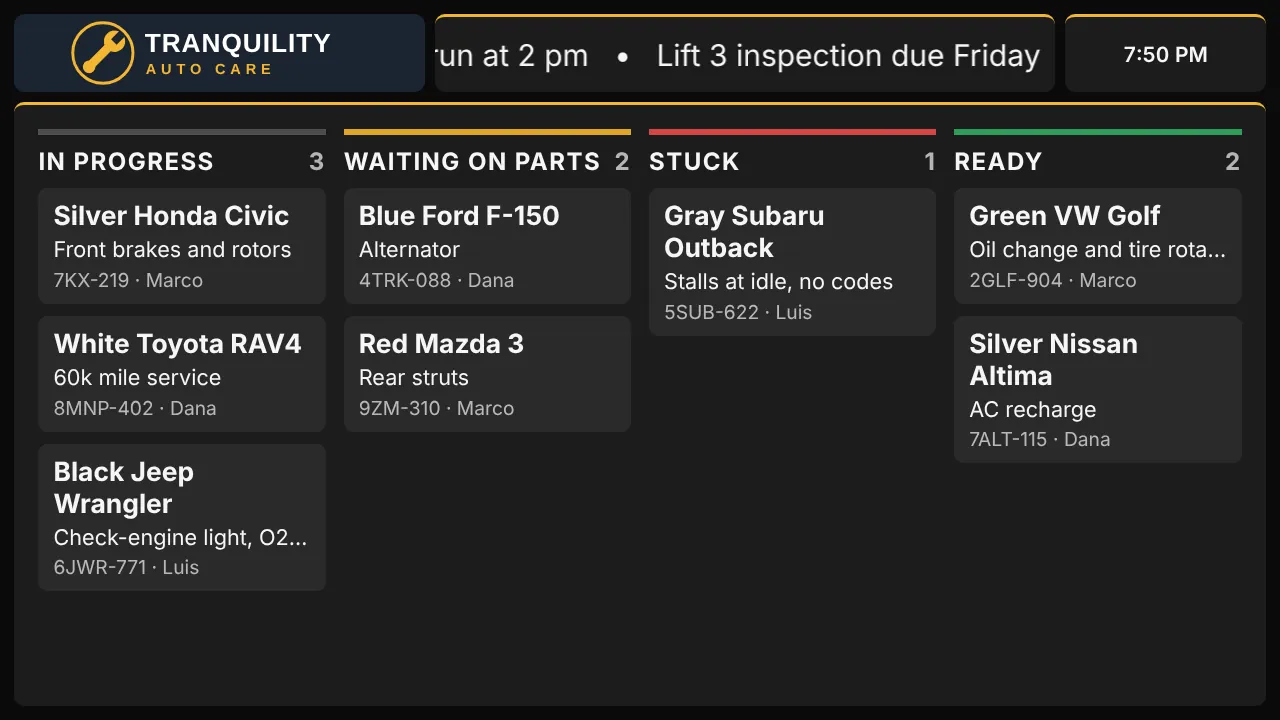
Rosa picked the Auto shop job board template: her logo, a ticker for shop notes, the clock, and a big job board. Each column is a state, and each card is a car with its job, plate and tech.
The columns are hers to change: one per line in the widget’s Columns setting. The template’s sample cars show until the first real change.
Techs update it from their phones
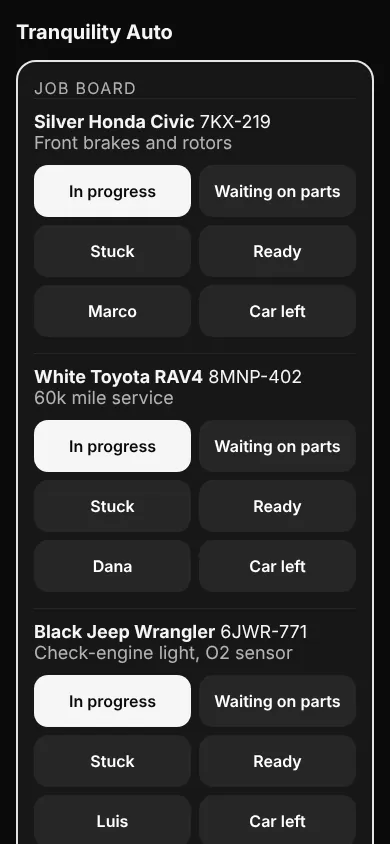
Nobody edits the job board in the editor. It’s updated in Data:
- On a phone, open
moonsuite.live/data/and sign in. Every job board and Now serving queue on your moons is listed there by name. - Tap a car’s new state: In progress, Waiting on parts, Stuck or Ready.
- Tap the tech’s name to change who is on it, or tap Car left twice when it drives away.
- Tap Add job when a car comes in: the car, its color and plate, the work and the tech.
Every TV showing the board changes within seconds.
The waiting-room screen
The second TV, in the waiting room, follows the same board but shows less of it.
- Make a moon from the Auto shop waiting room template, or add a job board to any moon.
- Set its Who sees it to customers. Customers see only each car’s color, model and state: never the plate, the owner or the tech.
- In Follow another board, search for the shop-floor board, or paste its code from under the board in Data.
Now one tap on a tech’s phone moves the car on both screens. The waiting-room board can have fewer columns: a car whose state isn’t one of them lands in the first, so Rosa’s customer board shows stuck cars as in progress.
People stopped coming to the desk to ask. They look up.
The same idea, other counters
A job board is any work in progress that several people need to see at once: tire and bike shops, phone repair, dry cleaners, pharmacy pickup. If what you need is a single number called out to the room, use Now serving instead; in Data it has Next, Back and Reset.
About the story. The people and businesses in these guides are made up. They show how we expect a moon to be used, not the experience of real customers.

