 Moon Suite
Widgets
Table: a schedule or list in rows and columns
Rows and columns for anything you’d put in a spreadsheet: a class timetable, today’s appointments, the rota.
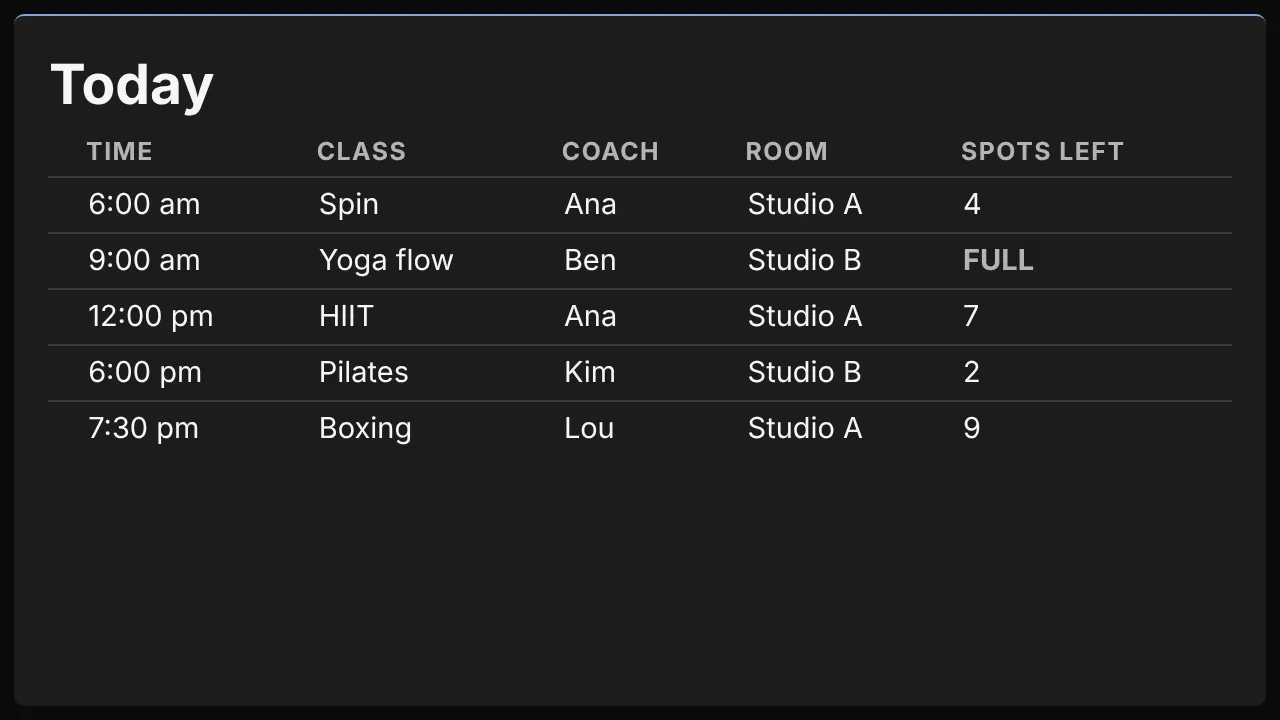
What it shows
A title, then the column headings, then your rows. It is four cells wide and three high when you add it.
Add it
Drag Table from the Widgets list onto the grid, or tap an empty cell and pick it. Click it to open its settings: on a computer in the panel on the right, on a phone in a sheet from the bottom.
Settings
| Setting | What it does |
|---|---|
| Title | The heading over the table, such as “Today”. |
| Column headings (one per line) | The columns, in order. With a sheet: the sheet columns to show; blank shows all of them. |
| Rows | One row per entry. Ignored when a sheet is set. |
| Google Sheet (CSV link) | A sheet published to the web as CSV. Read every 5 minutes. |
| Mark now and next by column | The heading of a column of times, such as 6:00 pm or 18:00-19:00. A time with no end lasts an hour. |
| Show “Full” at 0 in column | The heading of a column of counts, such as “Spots left”. A 0 there shows as Full. |
Like every widget, it also has a Background colour, and Show last updated, which marks when it last refreshed its data. Late data is always marked.
Good for
- A gym or studio’s classes for the day, with spots left.
- A clinic’s or salon’s rota, or a school’s room bookings.
- An office’s events for the day.